Published by Jeremy. Last Updated on July 7, 2026.
Disclaimer: This Week in Blogging uses demographic data, email opt-ins, and affiliate links to operate this site. Please review our Terms and Conditions and Privacy Policy.
As part of my push to revive a dead blog, I stumbled upon recommendations to add summary boxes at the start of articles.
In a way, these summaries check a lot of, pardon the pun, boxes when it comes to refreshing old blog content- they can have a few hundred words and be a “substantial” update, they are immensely quotable by AI Overviews and LLMs, you can sneak some affiliate links in for users who may bounce, and, perhaps most importantly, adding them into an article also gives you a chance to re-read old content and do more updates further down the page, too.
So in this one, I thought I'd share more about my approach for using summary boxes to refresh old blog posts!
How to Create a Summary Box
When I first started creating summary boxes, I used my very limited code knowledge to create some horrifically ugly, unformatted boxes that I, quite frankly, hated.
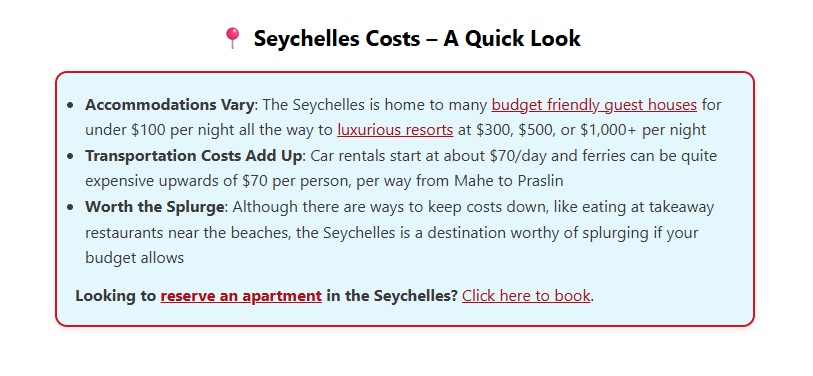
But then I had a lightbulb moment- AI is really good at coding, and I put in what I wanted and asked an LLM to update my prompt to make my code boxes smaller (not be full-width) and to improve the use of my site's color aesthetics. After a few rounds of iteration and tweaking on my own, I ended up with the following code and its corresponding output:
HTML Preview:
<div style="max-width: 700px; margin: 25px auto; font-family: 'Segoe UI', Roboto, sans-serif;"><center>
<h2 style="color: #000000; font-size: 22px;">📍 <strong>Intro Box - A Quick Look</strong></h2></center>
<div style="border: 2px solid #d61a0c; border-radius: 12px; background-color: #bbecf96b; padding: 18px; box-shadow: 0 3px 8px rgba(0,0,0,0.08);">
<ul style="padding-left: 10px; margin: 12px 0 0; font-size: 16px; line-height: 1.6;">
 	<li><strong>Point 1</strong>: One sentence description giving more info</li>
 	<li><strong>Point 2</strong>: One sentence description giving more info</li>
 	<li><strong>Point 3</strong>: One sentence description giving more info</li>
</ul>
<p style="margin: 12px 0 0; font-size: 16px; line-height: 1.6;"><strong>Affiliate text prompt</strong>: <a href="">Click here to buy</a>.</p>
Visual Display:
📍 Intro Box – A Quick Look
- Point 1: One sentence description giving more info
- Point 2: One sentence description giving more info
- Point 3: One sentence description giving more info
Affiliate text prompt: Click here to buy.
The above code can be tweaked for other sites by simply changing your colors or change the emoji, and I've used variants across several of my websites inserting right after the Read More tag and just before my first H2- ensuring the box does not appear in summaries, archives, tag/category pages, or in my newsletter send.
But, why does this work so well? This is perhaps a more interesting discussion.
Standardized Code – Immensely Repeatable Work
One of the things I love about having a standardized, generic code like this is that I can copy, paste, and edit into old posts relatively quickly.
My workflow is simply a matter of going into an old post (I target posts that rank on the first 1-3 pages of Google with < 1% CTR rate as candidates to update first), skimming through to remind myself of everything I talked about (updating out-of-date material as necessary), and picking out three or four points I want to highlight right away.
After getting into a pattern, it was easy to get through 10 or so articles in an hour of work, with some articles taking more time and others less, and after a couple of weeks I found myself having updated 100+ articles!
So as you can see, having a standardized code block isn't re-inventing the wheel here. You do it once, and then customize post, after post, after post.
Variations We Use
That said, I do not use the same identical prompt in every post. Variants I use on my travel blog include the H2 tag having titles like “A Quick Look”, “Where to Stay”, “What Not to Miss”, “Top Takeaways”, and the like after a target keyword.
So in one post about Madeira, the title blocks may be “Where to Stay in Madeira – A Quick Look” whereas another post may be “Hiking in Madeira – Important Tips”. The first half is almost always one more instance of our top SEO keyword, whereas the second half is tailored to what will follow in the content box.
From there, the individual points we make are tailored to the article itself. Where to stay in Madeira perhaps had one bullet point for where to stay if hiking (with a ton of affiliate links) and another about where to stay for wineries, whereas a hiking tips post may talk about the terrain, planning for timed entry, and packing considerations.
After the bullet points, I always throw in one explicit affiliate link for good measure, either via Stay22 for hotels, Amazon for products, or the like. I generally just keep these generic and standardized across the board, and only swap them out for broad, categorical matches (products vs hotels, etc.).
What About Bounces?
Now, you may be wondering, if you provide all the value in a blog post up-front, wouldn't more people bounce? It is possible, but in my experience this is not the case.
If anything, the opposite is true. Summary boxes, when done right do a really good job at telling a reader about what you're going to dive into. A good introduction should do this, sure, but summary boxes, for my writing style at least, are much more effective at conveying my thoughts.
So while someone may read “stay in the north of Madeira for easier access to top hiking trails” and could bounce and move on, if anything, an engaged reader may look at that and go “okay now I need to know more as to why”. It is a hook, and it helps encourage people to continue reading just as much as anything else.
But, in the event that someone does get all the information they need from the summary box, well my affiliate link is right there, so please book something on your way out. (We also let Stay22's Spark feature automatically link relevant content to hotel bookings if the text allows- another win!)
And About Those AI Overviews
Finally, we come to the fact that summary boxes are immensely quotable to LLMs and AI Overviews. After doing my work installing hundreds of summary boxes across my sites (along with Schema Markups which I believe work in tandem here), I saw a significant uptick in citations by AI.
Now, I'll be the first to point out that I recognize that bloggers have a wide array of opinions about AI citing content. But for my blogs, I take a pretty simple look.
First, AI is going to keep on existing whether we like it or not.
Second, many bloggers are not optimizing for AI citations well at all.
Third, if I can't beat them and stop AI outright, I may as well do what I can to get cited and enjoy whatever nominal traffic it provides when the alternative is no traffic.
As such, I look at it almost as an opportunity worth exploring simply because it is difficult and most are not touching it right now. Yes, I don't like AI. Yes, I would be happy if we reverted back to a standard top 10 of the days of old. But I also recognize that I cannot change the market on my own, so I am leaning in rather than running away, because the health of my business demands it.
So, much like how summary boxes are good hooks to get users to continue to read, when cited properly, it could result in an extra click from AI to reach your site outright as well. A win-win if it can work, well, if we ignore all the other obvious issues with AI, at least.
So, overall, I'm really pleased with how my summary boxes have been working in refreshing old content. These alone likely aren't the only reason I'm seeing an uptick in traffic (Schema Markups and general refreshing of posts likely also helps), but as these are seemingly substantial updates all the same, I have to say, I don't think they hurt!
Do you add summary boxes to your articles? What do you think of their performance? Comment below to share!
Join This Week in Blogging Today
Join This Week in Blogging to receive our newsletter with blogging news, expert tips and advice, product reviews, giveaways, and more. New editions each Tuesday!
Can't wait til Tuesday? Check out our Latest Edition here!

Upgrade Your Blog to Improve Performance



Check out more of our favorite blogging products and services we use to run our sites at the previous link!
How to Build a Better Blog
Looking for advice on how to improve your blog? We've got a number of articles around site optimization, SEO, and more that you may find valuable. Check out some of the following!