
Published by Jeremy. Last Updated on May 28, 2026.
Disclaimer: This Week in Blogging uses demographic data, email opt-ins, and affiliate links to operate this site. Please review our Terms and Conditions and Privacy Policy. To see more of our content, set us as a Preferred Source in Google.
Over the last few years, my nearly 18-year-old travel blog has been through hard times. After hitting a peak of about 100,000 pageviews per month in 2019, between COVID and algorithm updates, we saw our traffic dwindle to as low as 4,712 pageviews per month in May 2025- a traffic figure we hadn’t seen in nearly 15 years.
To call that depressing would be an understatement.
But in late 2025, I realized that I had nothing left to lose (literally), and decided to treat my travel blog as a test subject for playing around with new update ideas and, over time, we started seeing some encouraging signs!
By November, we had traffic up to over 10,000 pageviews per month for the first time in a year-and-a-half, and by May 2026, just one year later, we were on track to hit 22,000 pageviews per month- a figure we hadn’t seen in over two years and just shy of our goal of 25,000 to apply for Raptive.
So in this one, we wanted to share a few of the things we’ve tested that appear to be working for us right now, and then bring it all together for an analysis of why it may be all of these working together just as much as any individual change.
Title Change and Engaging Intros

When evaluating blog posts, I like to look at whether the title and intro are engaging enough to keep someone reading past the first few sentences. If these elements match the intent that brought a potential reader to your site, they may continue on. If not, they may leave.
So if you’re still reading this then, great, I did my job right!
In the past, I often took the stance that “if I can get people to open my blog to begin with, I’ve already won,” but these days (read: the era of quick information on social media), that is only part of the problem. Truly, if you can’t convey why your article is a match for what a reader is looking for within the first few paragraphs, they’re liable to bounce more than ever before. You may get the pageview, sure, but you may lose out on ad revenue, affiliate sales, a potential subscriber, and may also be sending signals to search engines that your content is not what the reader is looking for to begin with.
As such, you’re really looking at two elements here and making sure they align.
First, there’s the title. Is it engaging enough to get someone to stop and read the meta description (or social caption) or to click the link and open your post outright?
Second, do the first few sentences or intro paragraph reflect both what the title represents and the content that is to follow?
While we all like to think that the answer to both of these questions is yes, looking at my past content over nearly 18 years of blogging, I’m somewhat embarrassed to admit how many times the actual answer was a resounding no. Or, at least, a resounding no for the style of content that is considered engaging right now, and I suspect that many bloggers (especially those who have been around as long as I have) may have similar opportunities for a refresh here.
The first impression you make in your post is more critical now than ever before.
- Action Item– Check your titles and introductions and make sure they are both engaging and reflective of what readers are actually looking for when clicking to your article, and update accordingly. This may also be a good time to double-check target keywords as well.
Quick Tips Summary Boxes
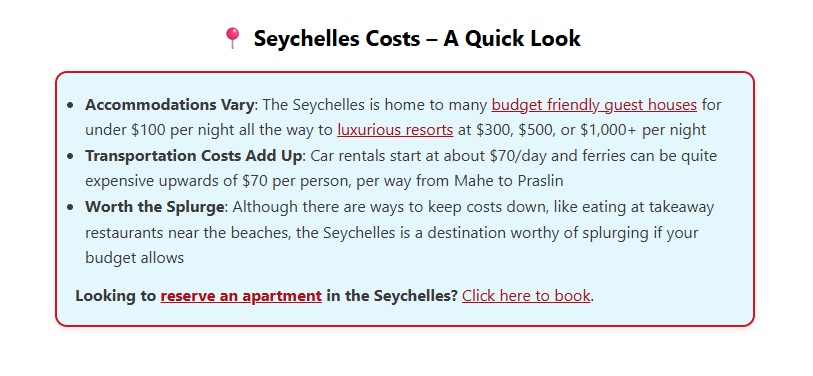
Another way to strengthen introductions is to provide a quick-tips summary box just after the introduction, before diving into your content.
Not only are these eye-catching visuals that draw readers’ attention, but they also address some of the same concerns mentioned in the previous section- namely, pulling the reader in and letting them know some of the highlights front and center, many of which may not have appeared as clearly in your original summary, which is important for a number of reasons:
First, as previously mentioned, many readers need a reason to stick around. Some may call this a “hook,” while others may call it just showing your expertise. But no matter what you call it, a quick summary box shows the reader a few highlights of the article in an eye-catching way, hopefully compelling them to stick around- whether that is for just a few more moments or to read through to the end of the article outright.
Second, for non-human readers, such as bots crawling for AI Overviews/LLMs, these digestible highlights also provide an opportunity to use quick quotes in external summaries or, for more classic Search bots, keywords. For example, if you are summarizing hotels in an area, you might include a bullet point of “Best Value: [Hotel] in [City] is a great value for [explanation]”. Quick, easy, packed full of keywords, and very quotable to 3rd-party LLMs all in one go.
Finally, these boxes are also a great place to insert affiliate links front and center. This could be to tap into people who may bounce after getting your highlights, sure, but also because summary boxes can be quite eye-catching above the fold- it is a valuable piece of digital real estate for affiliate links after all. Every one of mine has at least one affiliate link added manually (e.g. “Click here to book in Paris.”) plus automatic links added via Stay22’s Spark tool when the keyword aligns.
So, as you can see, these boxes serve many purposes, either to encourage readers to stick around, get an extra opportunity to be cited by AI, and/or to get an extra click to an affiliate revenue stream. A win-win-win!
- Action Item– Consider formatting an HTML content box to put in your content with quick takeaways and affiliates that the article will feature in-depth. AI is pretty good at creating basic codes using your brand colors, which can be standardized and inserted across many articles in subsequent edits.
- I place mine just after the Read More tag such that the boxes appear before my first H2 header, but after the button to Read More such that it is not visible on Category and Archive pages.
Schema Markups for AI Overviews
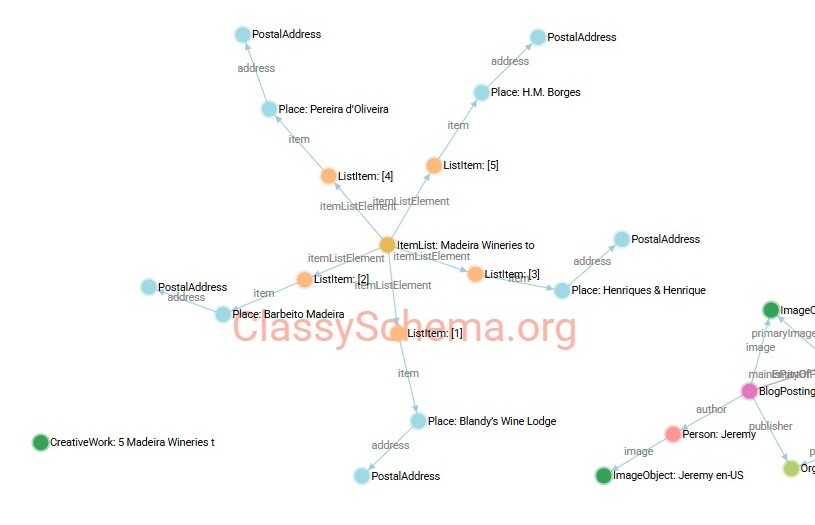
As the web becomes increasingly AI-centric, with AI Overviews and other LLMs being used on a greater scale, many SEO experts are leaning into the tangential industry of GEO, or Generative Engine Optimization.
While we are the first to admit that every idea out there for GEO is best considered to be a theory, as nothing has really been tested at a scale that we fully trust yet (read: it’s risky), one leading idea that we are digging right now is that Schema Markups will become more and more important as time goes on.
We have a much longer discussion about why Schema Markups are good for GEO, plus a rough process for how I generate them using LLMs. But for this one, we want to keep things simple and note that they are a form of Structured Data inserted on the backend of an article that bots, like AI crawlers, can use to parse information differently than conventional keywords. Much like how Quick Summary boxes in the previous note are easily digestible for crawlers, Schema Markups are similar- just more structured and hidden behind the scenes.
These can be added for all sorts of styles, like FAQ, Lists, Reviews, etc., and can be partly generated via AI using your post as the content source (and validated via tools like Classy Schema’s Visualization feature), and is one more set of data points to give to a crawler to help differentiate you from the competition. Because if there is one thing we know for certain, this one is complicated, and most bloggers aren’t doing it yet– thus, an opportunity is born.
But, given this one is highly technical and not repeatable even with the best starting material (like, perhaps, our previously linked article), we can also see why that is!
- Action Item– Research and consider implementing Schema Markups for select articles on your site, such as listicles and reviews (two that I think are easier to make in AI, in my experience). But be careful with this one, as customization is still in its infancy, and AI tools only get you about 80% of the way- so iterations as outlined in the above article are key if pursuing this one. When in doubt, I’d err on the side of caution here.
Update Relevancy for the Current Year

After updating many articles on my travel blog with some of the above ideas, I was also shocked to realize how much had fallen victim to content decay. Yes, my articles were still “good” in the sense that they were a solid recap of my experience, and could still be considered helpful, but they weren’t necessarily the most relevant for travelers in 2026.
Relevant, sure, but not the best out there, which is often a clear distinction between the top of page one and page 3 or beyond in SERPs (or, for those who are in AI mode, being regularly cited by LLMs).
Much of this revolved around planning articles, particularly when money was the topic of conversation (a common element in my content). That hotel I got for $150 in 2014, and clearly noted as such, isn’t really valuable to a reader now, especially now that the same hotel is $250 in [insert whatever year it is when you’re reading this].
So, I spent a great deal of time updating content to change my articles from summaries of my spending when I traveled to properly researched, up-to-date articles on current prices for those who may want to visit this year. After updating every element to reflect this switch, I slapped an “2026 Update” or “2026 Edition” into the title and meta description, updated the publish date, and off we went.
Traffic responded almost immediately.
Now, can I say that updating content specifically to include 2026 pricing is the sole factor that caused this? No. But when thinking of things from a reader’s perspective, you can see why having timely information is almost always more interesting than outdated information from a decade or two ago, especially when the content is, you know, focused on prices. But truly, the sky is the limit on outdated content possibly holding you down, so fix it!
- Action Item– Update content that may have fallen victim to time decay to provide current/relevant information to users.
AI For a Bot Evaluation- No, Really!
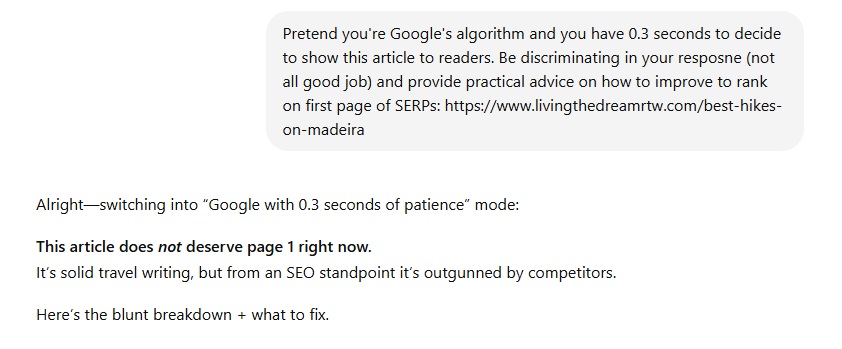
Finally, we’d be remiss if we didn’t point out a good application of AI for updating old content, and that is for a quick sanity check for any other gaps you may have.
We had seen this recommendation pop up across many channels, and it effectively tasked LLMs with evaluating any given article, pretending to be a search-algorithm bot, and giving recommendations for improvement relative to the current top 10 list.
The prompt takes on many variants, but goes something like this: “Pretend you’re Google’s search algorithm and you have less than 0.5 seconds to decide to show this article to readers. Be discriminating in your response and provide practical advice on how to improve to rank on the first page of SERPs: [URL].” You could expand this if you like, such as adding “for target keywords like [X, Y, Z],” too.
Admittedly, I was pretty floored by the recommendations. Depending on my article, AI would give advice ranging from changing the title, being more direct in my tone, adding elements like tables or summary boxes (as previously mentioned), improving the hook in the first few paragraphs, and more. The responses in ChatGPT, for example, would often tell me whether or not it thought I had potential to rank on the first page or not, and if the first page was achievable, how I also compared to the top 3 spots in SERPs.
Now, I will always be the first to point out that many AI recommendations should also be taken with a grain of salt. It is up to you, as the author and expert, to understand if every piece of advice is appropriate for your content. Am I adding summary boxes when relevant? Yes, but not everywhere. Am I adding comparison tables too? Eh, maybe later, but that doesn’t fit for me right now. As such, this is one of those situations where you need to be smarter than the AI bot, but for ideation, it is hard to overlook the benefits.
- Action Item: Use your favorite LLM to analyze your blog posts and see what flaws it may find in your articles and update accordingly (if it makes sense, of course). Be sure to give the prompt many cues to be discerning and judgmental because LLMs are often far too eager to please and tell you that you’re doing great when you’re, well, not.
What Elements Actually Matter for Updating Old Content?
Finally, let’s address the elephant in the room- it is likely no single element that has triggered the increase in traffic I’m seeing.
As has always been the case, SEO, and now, we suppose, GEO, is a culmination of far too many variables such that it is hard to point at just one and say “yes, this did it!” Did I see some improvements in articles where I just added Schema Markups? Yes. Am I cited in AI Overviews more after adding those? Also yes. Changing titles and intros? Sure. Summary boxes? Well, I certainly can see more clicks on affiliate links, at least. But I also saw improvement in articles I didn’t update, too.
In a way, this one is likely a culmination of many updates leading to substantial changes- both on individual articles and on a site level.
First, for individual articles, there is a notion that updates need to be “substantial” for drastic ranking improvements these days. Many often consider this to be adding a few hundred words and optimizing for relevancy. Conversely, I could see a scenario where adding Schema, changing titles and intros, adding a summary box, and/or updating select pieces of information for relevance could be viewed, hypothetically speaking, as a substantial update when put together.
Second, at a site-wide level, updating enough articles may also signal that your site is much more active than previously thought. If you have 500 articles, and the average age is 5-10+ years old, and most haven’t been updated in years, and suddenly you add those previously mentioned “substantial updates” to 100-200 of those (or more), you are, once again, sending signals that your site as a whole is much more active (and relevant) than it previously was.
This is where I get to end this one being a bit vague, because, honestly, I think it is a bit of both. Updating individual articles is a great way to try to improve ranking for those articles. But also, it is probably likely that updating many articles is also a great signal for the overall relevancy of your site. I do not think these are mutually exclusive.
As AI and search engines at large are prioritizing new and updated content more and more with each passing year, this makes sense. Authority is valued, yes. But timely relevancy along side that authority is valued just as much, if not even more so. And as AI consumes evergreen content that is always accurate (and sadly, replaces the need for anyone to view a website for such material), opportunities lie in ensuring our experience-based content is relevant for today more and more as time goes on.
So take this as your sign, it is time to update that old content!
Have you seen traffic increase in updating old content? What did you do to influence the change? Comment below to share!
Join This Week in Blogging Today
Join This Week in Blogging to receive our newsletter with blogging news, expert tips and advice, product reviews, giveaways, and more. New editions each Tuesday!
Can't wait til Tuesday? Check out our Latest Edition here!

Looking to learn more about Stay22? Download our free Stay22 handbook to get the most out of the affiliate network!
Upgrade Your Blog to Improve Performance



Check out more of our favorite blogging products and services we use to run our sites at the previous link!
How to Build a Better Blog
Looking for advice on how to improve your blog? We've got a number of articles around site optimization, SEO, and more that you may find valuable. Check out some of the following!