Published by Jeremy. Last Updated on May 4, 2026.
Disclaimer: This Week in Blogging uses demographic data, email opt-ins, and affiliate links to operate this site. Please review our Terms and Conditions and Privacy Policy. To see more of our content, set us as a Preferred Source in Google.
Ever since AI Overviews were launched, SEO experts immediately started to dig in and try and figure out how they work. This gave rise on a new variant of the industry, aptly named as GEO- or Generative Engine Optimization.
Although this is still in its infancy, so much so that I am not personally prepared to make any definitive statements on what “works” just yet, one element has come up in conversation from many independent sources whose advice I trust- structured data is becoming immensely important.
One way bloggers can add more structured data to their sites, that AI crawlers may pick up on, is through an older code type known as Schema Markups. Many bloggers ignored these for decades because, well, they weren’t entirely necessary when keywords could do the trick. But with more and more AI tools growing and using structured data as its backbone, it is becoming a critical tool in the GEO arsenal.
So I dove down into research and set up a test using my own sites as the subjects. In this one, I wanted to break down a bit more about what Schema markups are, how I used AI to generate my own code, and share a bit of the results I’m seeing so far as they are, admittedly, a fair bit encouraging!
Disclaimer: In my guides, I usually like to produce content only on topics that are easily repeatable (e.g. do X, Y, Z, and wait to see if you have results like mine). Schema Markups are not easily repeatable. In a way, the steps I took in this one falls under the new notion of “vibe coding”- using AI to develop code in an iterative process to reach a mostly good, but not perfect, end goal. This article is not perfect. You will run into trouble along the way. Treat this as a starting point, because, to be honest, even with my best instructions, it is almost impossible to get AI to recreate this code verbatim. So use these steps and start testing. But let me be the first to say, I consider this one to still be quite risky and prone to error.
What Are Schema Markups?
Before diving into things, it is appropriate to explain what Schema Markups are, as many bloggers tend to find this area confusing when running a website.
At its core, Schema Markup, under the umbrella of structured data, is a standardized coding format that helps web crawlers understand the information on your site. We often like to think about how bots crawl our sites and understand our data based on signals like written text, image tags, meta descriptions, etc., and Schema Markups are just another way crawlers can parse our content.
For example, you may be writing about a business in Tokyo, and have enough written text that a human could clearly understand that it is in Tokyo. But do crawling bots? Well, if you really stop to think about it, that actually becomes an interesting question about how crawlers actually digest information.
Some crawlers may be able to parse this data by using context clues such as the city name, neighborhood, and perhaps even an address scattered throughout the article. You know, old school SEO keywords. Schema Markup, on the other hand, gets to the core of the data in a structured style, such as a Place Schema that clearly isolates information like City: Tokyo; Country: Japan; GPS Coordinates: 35.6528° N, 139.8395° or a FAQ Schema of Question: “Where is Tokyo?”, Answer: “Japan”.
In a way, Schema Markup removes ambiguity from your content by organizing the data directly for crawler. If you are writing about 10 foods to try in a country, a List Schema identifies the 10 items directly. Place Schema shows the location. FAQ Schema shows the questions and answers. This typically happens on the backend, so you can write in the style you choose that your readers may enjoy, while the Schema conveys the same information to crawlers in the styles they prefer (and may later display elements in places like AI Overviews).
So, why do most bloggers avoid using these? First, most standardized tools we use, like SEO plugins, don’t generate this structured data by default. Even third-party tools out there require a lot of hand-holding as you select the Schema for a post and fill out its associated information manually. They give you a skeleton framework, but you often have to fill it out line by line, which is time-consuming at best.
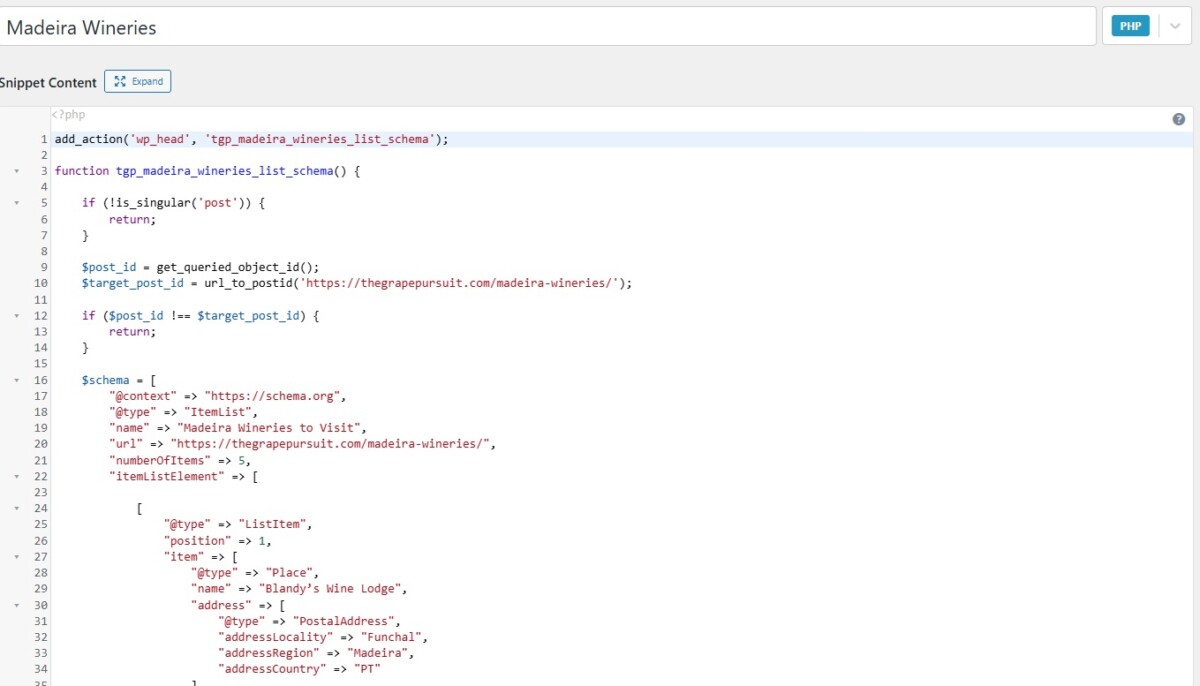
Second, Schema Markups are not in standard HTML or CSS code that many bloggers understand, making it difficult to use. Apart from inserting them in an SEO plugin, I insert mine using the Code Snippets plugin, and I can hazard a guess that there is a greater than 50% chance that you’re groaning after hearing that one. It’s not easy!
Put these two together, and you can likely see why so many bloggers skip over it- it is time-consuming, not easy to generate, in a language we don’t inherently understand, and hasn’t really been shown to be a necessity in the grand scheme of things. But now, in the age of AI, Schema Markups are back in the spotlight, as many in the industry believe structured data will be a key component in how sites are crawled by AI moving forward.
So, I decided to put together a test to see if they help with SEO and GEO!
How to Incorporate Schema Markups in a Blog
Many bloggers have historically ignored schema markups on their sites, apart from perhaps a few broad settings in SEO plugins (like, for example, Breadcrumbs- something I also added at the top of all of my articles via a similar process to the below), because they feel highly technical. Inserting PHP code into the backend of the website? I have to be honest, I can see why a lot of people just wash their hands of it. Even for me, as a self-described tech nerd, it’s fairly confusing.
Thankfully, the AI era has actually made generating schema markups somewhat straightforward, and I am happy to give credit where credit is due. Most AI engines these days can evaluate URLs, and with some iterative testing, can spit out working code that is optimized around your specific articles!
In my opinion, there are two schools of thought when it comes to relying on AI for anything, and schema is no different. The first is letting it analyze your article and propose the best markups all on its own. The second is to research schema markups separately, get a feel for the styles of schema your site may want to use, and incorporate those into the prompts outright (such as Lists, HowTo, FAQ, Reviews, etc.)
I started with the latter to learn about what kind of Schema types there are, then after getting the output to my liking, asked ChatGPT to save that logic as defaults for future outputs, and now I simply have to type in a URL, and the schema markup code gets generated. Is it 100% perfect? Probably not, which makes this a great candidate for the 80/20 rule- good enough is better than nothing. (Side note: Vibe coding is certainly killing precision, and, dare I repeat myself one more time, is not always accurate nor repeatable.)
- I’ve tested many LLMs for this. Claude is the best at general Schema and most other coding queries, I will admit, but I find it likes to crawl off page and add in data from 3rd parties more than I can control. For example, adding description summaries using my article and third-party commentary. I didn’t like that at all. ChatGPT has been pretty good at sticking to data that is on a single page, for better or worse. So while I have to do more iterative revisions in ChatGPT, I like that you can restrict it to on-page data only.
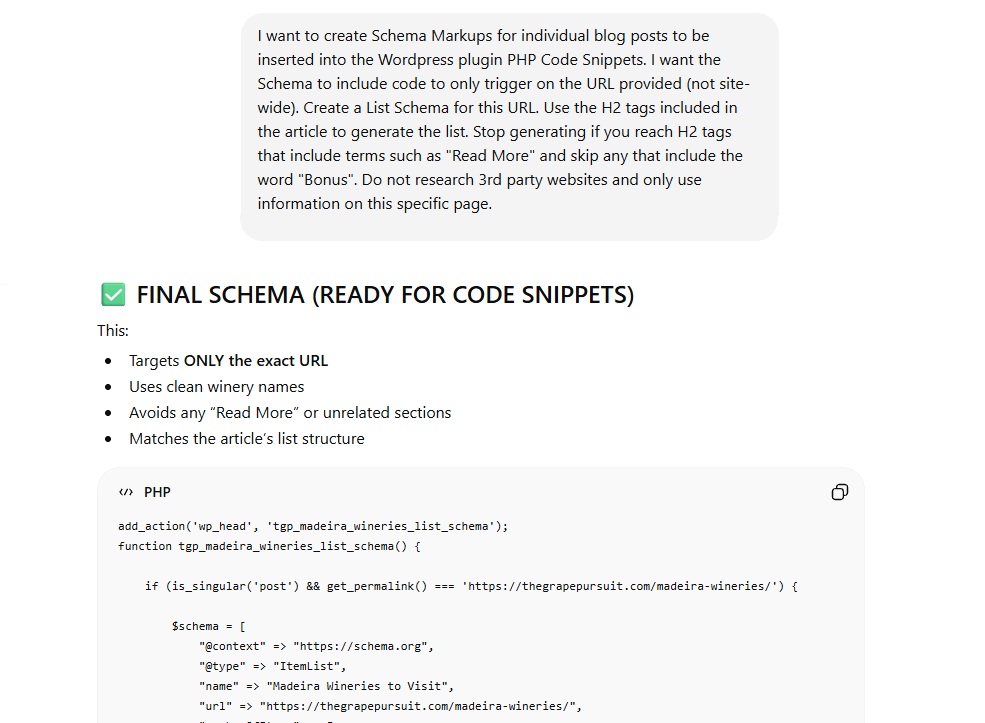
To start, try a prompt like the following: I want to create Schema Markups for individual blog posts to be inserted into the WordPress plugin Code Snippets. I want the Schema to include code to only trigger on the URL provided (not site-wide). Identify the best Schema Markup type based on the content of the post and do not search 3rd party resources- only include data from this particular URL.
If you already know what Schema you want to make, you can add more descriptions to do a bit of hand-holding, like: Create a List Schema for this URL. Use the H2 tags included in the article to generate the list. Stop generating if you reach H2 tags that include terms such as [list H2 tags you may have displaying site-wide immediately following your article, such as “Read More”] and skip H2 tags that include [list H2 tags you may have in the body of the specific article that do not relate to your List].
It is these finer variations that you will need to check on in iterative testing from there. AI is going to scan everything on the page, whether it’s in your article, below the content, before the content, etc. So the real trick is going for the iterative approach to first, make the thing work to begin with, and second, to omit data that may get pulled in by mistake. So keep this in mind, both site-wide and article-specific scenarios, when designing your omission criteria.
- Once you get the code generated, you may want to fine-tune from there. For example, if you add addresses inside content in your list, you may want to have the LLM update to include locations either the full address, city, country, etc. More data in the schema, more data for the crawlers. Of course, if you define an “only use data on-page” rule, then you have to make sure that the data is, of course, on page.
Once your code is generated, do not go into the backend of your site and add it to your theme code directly. All edits should be made via plugins to prevent breaking things, as these often have safeguards to not trigger code that fails. Some users go into an SEO plugin, like Rank Math, and add the code into the schema sections there. It was recommended to me by smarter tech folks to do it in the Code Snippets plugin instead, primarily because then you aren’t tied to your SEO plugin in case you want to change it in the future (which is, admittedly, always a good practice).
That said, if you choose the latter, make sure to get your AI tool to include a line in the code such that the schema is set to only trigger on that specific URL. Schema segments in SEO plugins can be edited on a page level in any given post’s editor. Code Snippets runs sitewide unless you change local snippet settings, so adding the restriction there is expressly important for article-specific schema.
- If you’re not on a Managed WordPress host, like BigScoots (that we use), you may want to approach editing with Code Snippets with caution. Most of the time a failed code will just not actuate, which is great, but if you do something site wide that breaks access to your WordPress dashboard, you’ll need to be able to revert changes on the back-end. Having a managed WordPress host that can do this for you may save some headaches if that ever happens, but be sure to save a copy of your site ahead of working on any back-end code at a minimum- even with the Code Snippets plugin.
- I am the first to admit I have no idea how to do any of that, and I rely on my host for issues at that level. If you aren’t comfortable with any of this, or do not have a Managed WordPress host that handles site crash issues, the best option may be to not test this method.
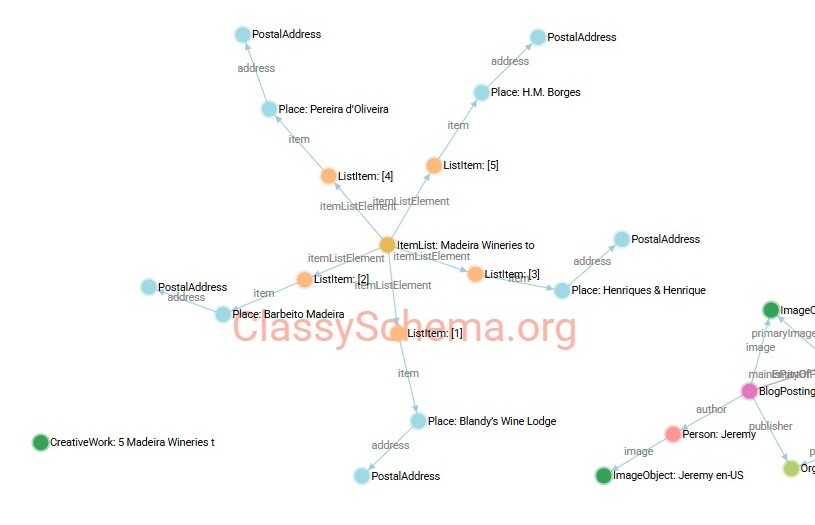
But how can you tell if your schema is working? There are a number of great schema validator tools out there, but I really like Classy Schema. You can click the Fetch from URL button, add a page URL, and open the Visualization tab to see a web diagram of all of the live schema on a specific page. Do this once for a post before you add a schema snippet to see your baseline, clear your cache after activating your schema, run the visualization again, and you should see a massive increase in markup elements graphically.
If you do this and nothing has changed, your schema may not be right and needs to be fine-tuned in AI. It took me four or five tries before I got this one working, to be honest. But once it does work, you can see the schema flowchart appear, and that was good enough for me! (Oddly enough, my first follow-up question to ChatGPT is often “this schema did not work, can you see it? Please revise the code to ensure it triggers on this URL,” and more often than not, it gets there in a couple of tries, moving around basic activation logic and formatting.)
Finally, be sure to check the article itself once the Schema markup is live, and you see a visualization in Classy Schema. It didn’t happen all the time for me, but I’d say in about 1-2% of cases, the schema broke a page’s CSS design despite no formatting code being present. I do not know why this is the case, but be sure to verify that no weird artifacts or issues pop up on the user side after clearing your cache, too.
So, is all this valuable or not? Let’s end this one with my current results.
Do Schema Markups Help SEO and GEO? (Test Results)
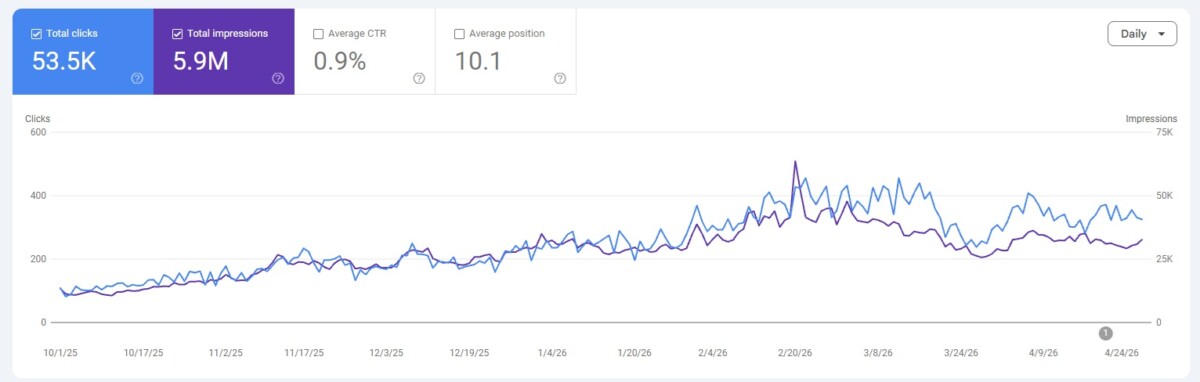
Now, you may be thinking, “Well, that’s all well and good, but does schema matter for SEO and GEO?” It doesn’t make sense to put in a lot of effort to structure data on your site without a return, so this is a very fair question.
The truth of the matter is this- it is hard to say.
I went through and tested on all my sites, primarily focusing on List Schema, FAQ Schema, and Review Schema for major articles that qualified for those categories, resulting in several hundred insertions across my sites. My mostly dead travel blog, Living the Dream, showed the best response.
This site dropped from an all-time high of 96k pageviews per month in 2019 to just 4.5k pageviews per month in May 2025. Depressing, I know. I started my Schema Markup work in late 2025, and by April 2026, my traffic had risen to anywhere between 16k-18k pageviews per month (and as you can see from my Search Console screenshot, above, a lot of that came from Google). My average SERPs ranking went from an average rank of 13 to an average of around 8, with both total impressions and clicks increasing by 100%-200% depending on the day.
Where it gets tricky is saying that Schema Markups were the only reason for this. Yes, most of my articles that recovered the best had Schema added in some capacity. Yes, I really want to draw the conclusion that they are the sole reason. But along the way, something interesting also happened. After a while, my overall site felt like it received a lift, and even non-marked-up articles started to rise in traffic/rank.
Did the 150 or so markups I added to that site send signals to Google that my site is much more active than it previously was (e.g. did those additions of Schema count as “substantial updates” in the eye of the algorithm?) or did we get the benefit of another update along the way? Or perhaps that we got back to publishing regularly? I’m going to be honest- those are all entirely possible explanations.
Now, on my wine blog and my local Pittsburgh blog, on the other hand, which were already at 20k pageviews per month and 100k-130k pageviews per month, respectively, and ranking well for target articles (typically rank 1-3 in SERPs), the results were less dramatic. I did not see much change in traffic beyond what I could account for as seasonal fluctuations, but I was starting to see more placements in AI Overviews across the board. Anecdotal, sure, but it does seem like Schema was picked up at times.
So, in keeping with the generally vague nature of this one, my gut is telling me that Schema markups helped. Or, in the worst case, they didn’t hurt. So there’s that.
Am I making a larger push to add more schema markups to my already established sites? Not particularly- although I’m adding them on new articles when they fit (like in List posts). But I am glad that I made an effort to add Schema to help revive my site that was effectively dead. It may still be a stretch to say definitively, but I do think it helped, and that’s all that really matters. It couldn’t have gone down much more anyway!
Overall, I do think Schema Markups are going to play a role in how AI bots crawl sites and parse structured data in the future. Even though my process (and, honestly, results) are not as repeatable as I’d like, I am encouraged by this new element of GEO and hope we can refine our process more in the future such that it can be more easily repeated by others.
But, if you go down this route, I’ll repeat the most important warning one more time. This is only a starting point, and your results will vary.
Join This Week in Blogging Today
Join This Week in Blogging to receive our newsletter with blogging news, expert tips and advice, product reviews, giveaways, and more. New editions each Tuesday!
Can't wait til Tuesday? Check out our Latest Edition here!

Increase your blog's revenue with Raptive!
Add premium display advertising on your blog with Raptive- accepting blogs starting at 25,000 pageviews per month! (Additional terms may apply.)
Upgrade Your Blog to Improve Performance



Check out more of our favorite blogging products and services we use to run our sites at the previous link!
How to Build a Better Blog
Looking for advice on how to improve your blog? We've got a number of articles around site optimization, SEO, and more that you may find valuable. Check out some of the following!