Published by Jeremy. Last Updated on May 11, 2026.
Disclaimer: This post contains sponsored content. This Week in Blogging uses demographic data, email opt-ins, and affiliate links to operate this site. Please review our Terms and Conditions and Privacy Policy. To see more of our content, set us as a Preferred Source in Google.
This article was sponsored by Stay22.
We’ve been big fans of Stay22 for many years now, as the affiliate network has completely overhauled our earnings thanks to their many partners and novel products.
One of Stay22’s latest updates trends to the analytics and functionality side, with a complete overhaul of their dashboard hub!
So let’s take a look at some of the new features you’ll find in the hub, and highlight a few components we are most excited about.
New Stay22 Hub With Updated Analytics Features
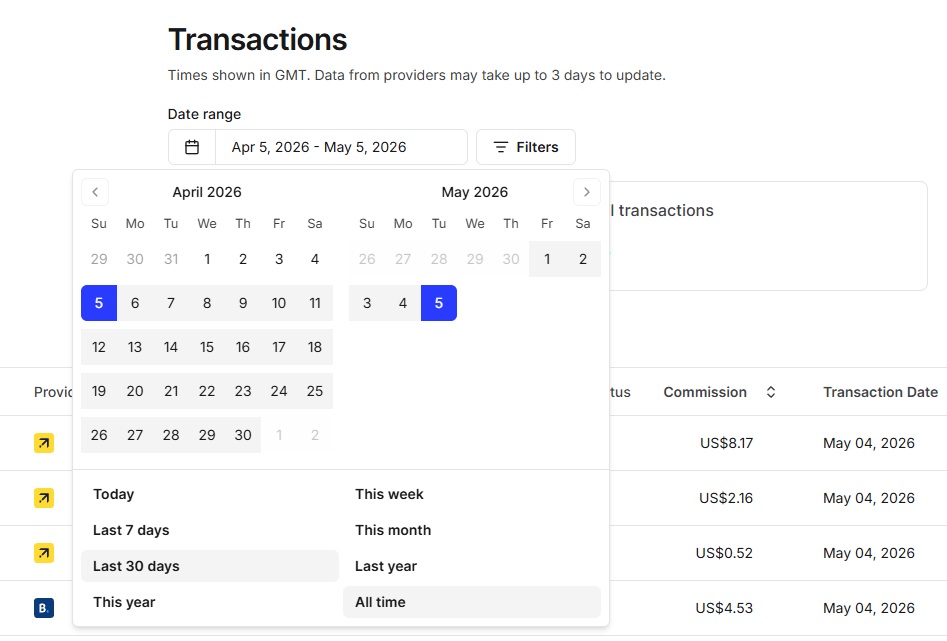
The new Stay22 Hub includes several new and returning features that creators need to be aware of.
On the surface, there are a number of updates that make organizing data a lot easier, like Stay22 bringing back the “All Time” sort option, the ability to save your table preferences for future log-ins, the month filter matching calendar months as opposed to rolling 30-day windows, and more details visible without hovering.
One of my favorite new features is the ability to customize your Transactions page to show data columns you are most interested in. Instead of having all of the data present in one massive table, users can toggle individual columns on and off using the Columns button found right at the top of the table.
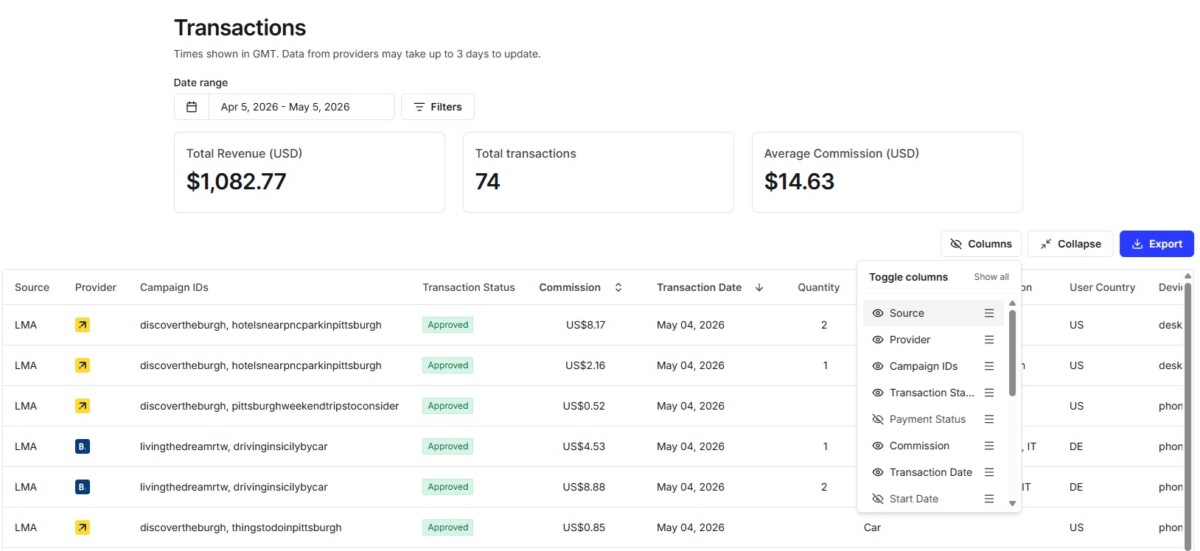
Here, you can turn individual columns off and on, like campaign IDs, partnered networks, traffic source, transaction status, and more. This one is quite helpful to me when I make quick checks at my performance, because I do not necessarily need to see columns like payment status, start and end dates, and transaction IDs when looking at a performance snapshot.
By editing my columns, I can include just the most pressing data fields to me when checking my performance, namely, the Source (which Stay22 product resulted in the sale), the Provider (which partnered network it was on), campaign IDs (telling me what site/page made the conversion), transaction status (approved vs canceled), commission amount, transaction date, quantity (typically number of nights for hotels), category type (hotel/car/etc), destination of booking, user country, and device used to book (desktop vs phone).
By cutting out other fields, this allowed me to get all of these fields in a single screen view without having to scroll, on my desktop monitor at least, and helped me get a quick understanding of my bookings on any given day without having to export data for more robust data analysis. (That said, they also added a Collapse/Expand toggle button as well that helps show more information on page when using Stay22 on a larger display!)
Allez and Script Builder Tools Get a Makeover, Too
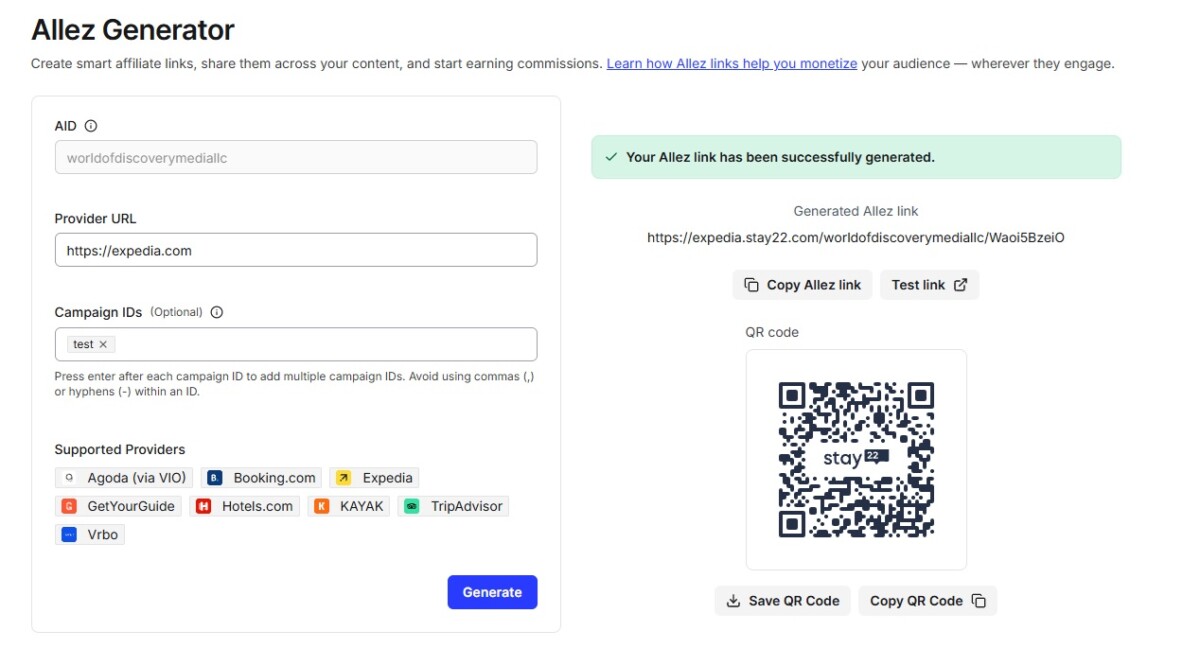
For those who like to have control over link generation and partnered networks, one element of the new hub that I appreciate is that Stay22 is much more transparent on what partner networks are available in the Allez Generator (link builder) and Script Builder screens.
On the Allez Generator page, the clear list is a helpful reminder of all of the available services that can be made into Stay22 affiliate links. This is not only a timely reminder of all the services as part of the Stay22 brand portfolio, but also is a bit of a sanity check before you may try and create a link for a non-partnered network. (This has happened to me several times, I must admit.)
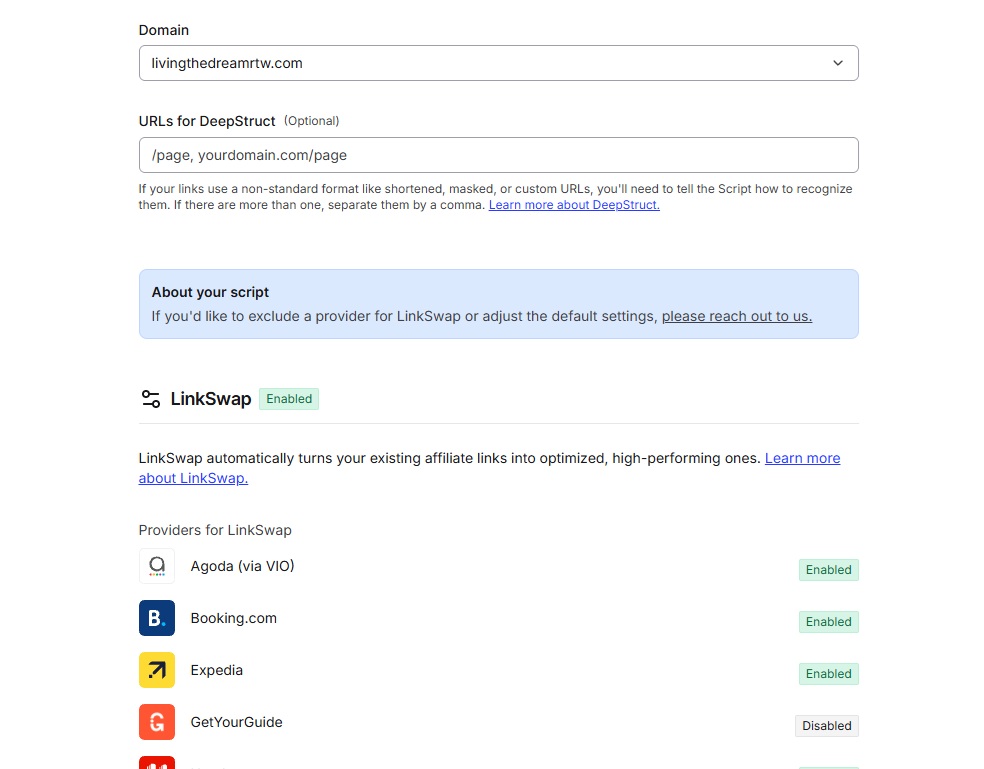
On the Script Builder page, when you build a new script, the layout shows exactly which products and partnered brands are activated. In the past, we know there has been some confusion over what products are included in the script, as well as what partnered brands are activated, and this update clearly displays all of the products, brands, and has many read more links to explain in detail what each service uses.
That said, the Script Builder still activates all of these products and brands by default; however, Stay22 has a prominent placement to open a chat box to help build a customized script, omitting elements.
Full Transition of the Hub Arrives on May 11th
For those who haven’t tested out the new Hub, it is also an important reminder that this one will fully transition on May 11th. So if you haven’t taken some time to familiarize yourself with the new interface, now is the time.
Thankfully, Stay22 knows some users may have questions, and they will be hosting office hours to cover all of the changes and new features soon! Whether you have questions about the new Hub or Stay22 at large, they will be holding Office Hours for members!
Click here to register for the event, taking place on May 14th, 2026, at 12pm EST, to get any burning questions about the new hub or Stay22 in general answered!
Looking to register for Stay22 Click here to get started today!.
This article was sponsored by Stay22. As always, all opinions are our own.
Join This Week in Blogging Today
Join This Week in Blogging to receive our newsletter with blogging news, expert tips and advice, product reviews, giveaways, and more. New editions each Tuesday!
Can't wait til Tuesday? Check out our Latest Edition here!

Looking to learn more about Stay22? Download our free Stay22 handbook to get the most out of the affiliate network!
Upgrade Your Blog to Improve Performance



Check out more of our favorite blogging products and services we use to run our sites at the previous link!
How to Build a Better Blog
Looking for advice on how to improve your blog? We've got a number of articles around site optimization, SEO, and more that you may find valuable. Check out some of the following!