
Published by Jeremy. Last Updated on August 24, 2026.
Disclaimer: This Week in Blogging uses demographic data, email opt-ins, and affiliate links to operate this site. Please review our Terms and Conditions and Privacy Policy. To see more of our content, set us as a Preferred Source in Google.
If you are considering starting a blog, you may find sorting through all the options to get started a bit dizzying.
I know I did.
But after being in the industry for nearly 20 years, there are thankfully many great services and tools out there to get started blogging on the right foot.
So in this one, I wanted to lay out the steps I’d take to start a blog in 2026 that will hopefully put you on a track to success!
- Notes: We recommend reading through this entire list before taking a single step, as many of the steps are more intertwined than sequential. For example, you’ll likely want to verify social media handles are available for your ideal brand/domain name before registering your domain, or you may want to publish blog posts before registering with Search Console. Since so many things go hand in hand and could be done concurrently, we need to keep the big picture in mind alongside these focused details. This is why our first three points will focus on developing your blog idea before a single penny is spent setting up a site!
- These recommendations are what we would do if we were launching a professional blog with the intent to build traffic and monetize. You do not necessarily need to do any of these recommendations if you are just pursuing this as a hobby. That said, we still recommend it as these are conventional best practices because you never know what the future may hold.
1) Determine Your Niche

If there is a single most important piece of advice we could give to a new blogger, it would be to have a clear and well-thought-out niche for your blog before doing anything else.
Gone are the days when you could start a general food blog, travel blog, or other broad topical blog and easily grow. Now, you need a much, much more focused topic to stand out from the crowd of millions of other bloggers. Yes, possibly more focused than a vegetarian food blog. Yes, likely more focused than a country or regional blog, too.
These could do well, of course, and there are still pockets of topics that have not been beaten to death by thousands of other writers. But generally speaking, the broader your topic, the more likely there are existing blogs (see: competitors), thus making it more difficult to stand out and grow. Of course, there are trade-offs to going too niche- there may not be enough people interested in your topic either (possibly having monetization risks down the line). As always, it is a balance that requires careful market research to see where opportunities lie.
There are ways you can work around this that we think are important to highlight in this competitive market.
For example, you could take a general blogging topic and have a strong focus on it from a unique angle that no one else is doing. My wine blog, The Grape Pursuit, has a quest to try every grape varietal in the world. That niche focus is largely untapped and helps my brand stand out from the rest. But I also do a broader range of wine content overall that is, in all honesty, not that much different from anyone else. It is still a wine blog at the end of the day.
Depending on your topic, you don’t necessarily need to be exclusively writing about the very focused niche component. But that focus does help with your marketing, and in an industry like blogging, optics can matter significantly when it comes to standing out.
Furthermore, a niche does not necessarily have to be something you are an expert on right now. It could just be an interest you want to explore more. To me, some of the best-defined niches give a blogger a pathway to eventually become the expert in their topic, be it through education, exploration, or other workflows.
An example that showcases this point is my Pittsburgh blog, Discover the Burgh. We wanted to do everything in Pittsburgh when we launched it, but had only done a few things up to that point. At 10 spots visited when we started, we were not experts (our site was sad, really). At 100 spots visited in the first year or two, we were getting interesting. At 1,500+ spots featured after a decade, we have become the experts (and even wrote a Pittsburgh book, too). Defining a niche that naturally lends itself to you becoming the industry expert (not just an expert amongst many, the expert above all others) can go a long way.
So before doing a single thing, do some market research and see what opportunities may be out there to niche down into something that hasn’t been beaten to death a hundred times already.
2) Write Down 100 Topic Ideas

Another point to keep in mind before spending a single penny is that many blogs fail before they begin. A lot of times, this happens when someone has an idea for a blog, launches it, gets overwhelmed (or bored), and quits well before any sort of established presence can be made.
I’ll be honest with you, very few bloggers are overnight successes these days, and most bloggers need at least two years before seeing any appreciable results- and that is if you’re doing things right from the start and have a bit of luck behind you. Yes, it is possible you could blow up on social media much faster these days thanks to Discovery feeds. But we’re talking about the website here, and that takes time.
We can quantify this a bit more, because that two-year metric can be a bit misleading, as time in the market does not guarantee success, either. (I had one blog blow up in six months, others that took way more than two years.) Perhaps a bit more quantifiable is that most blogs need at least 100 good articles before they start seeing any form of traction. Coincidentally, if you can also get to 100 articles, odds are good that you, personally, are now much more committed to success (via establishing good practices, like publishing regularly), too- so a lot of this goes hand-in-hand.
Much like how you should determine if your desired niche has market legs, you should also take some time to figure out a list of 100 blog post ideas before you even get started. If you have that plotted out in advance, the odds are much higher that you may actually work to get there after you launch.
Now, I am not saying you need to have 100 precise article topics written out and ready to go. You may be able to satisfy this with topic clusters that, when repeated, can also get you to 100 articles over time.
For example, on our wine blog we do individual bottle reviews, winery recaps, broader wine region guides, where to stay guides, wine course reviews, and wine course tips- multiply those six categories out over all the wines we’ve tried, regions we’ve visited, and courses we’ve taken, and you can see how we can get to 100 pretty easily across an array of niche topics.
Perhaps a bigger risk here is if you can’t sit down and come up with 100 topic ideas, because this may be a sign that your niche is too focused, lacks enough market potential, or that you may not be the best person suited to write about it outright. (If you can only think of 20 topics up front, are you going to be motivated to research and find more after launch? I would worry that answer could be no.)
Finally, one of the most common questions I ask new creators is a variant of “Would you keep doing this even if you weren’t growing/getting paid/hosted?” If the answer to this is no, it is entirely likely you’re getting into this for the wrong reasons, and you shouldn’t start a blog. The niche and interest should be for yourself first, and if you’re not in it for the love of the topic above all else, you may want to reconsider why you’re starting a blog to begin with.
- Thinking of launching a destination blog for a city/region/country? We’ve got you covered with 100+ local blog topic ideas here.
So open that notepad file and start thinking of some niche article ideas before doing anything else!
3) What is Your Marketing Plan?

One of the biggest problems that all creators have (bloggers, social creators, etc.) is marketing- that is to say, consistently reaching an audience.
The good news is that it has never been easier to find people who may be interested in your content (such as through Discovery mechanisms on social media, which work behind the scenes and showcase “popular” content). The bad news is that getting people to open a website is becoming much, much more difficult (those same social networks really don’t want users leaving their apps anymore- such as going to our blogs).
Blogging is not an if-you-build-it, they-will-come sort of business. In fact, I often like to tell new creators that you do not monetize a blog- you monetize an audience. Building that audience requires marketing, and for that, you need a plan.
Starting out, a marketing plan can be something simple, like the following:
- Posting on social media and paying for advertising
- Networking and collaborating with other creators
- Writing guest posts for other websites to get backlinks and citations
- Attending events/conferences in your niche to meet others in your community
Those may be ways you are marketing your site to reach readers. But marketing, to some degree, is also just about producing consistent content, like:
- Continually doing new things in your niche to generate content outright
- Publishing X articles/social media posts per day/week/month
- Capturing newsletter subscribers and sending out emails
- Incorporating current SEO/GEO optimization practices
- …we could go on
These are a bit generic, we admit, but it should highlight that you really need marketing plans in place along two tracks– one to grow your audience, and one to reach your existing audience. You’ll likely develop these more as you go (and don’t necessarily need to do it right now), because honestly the industry is changing so fast that there is no one-size-fits-all plan anymore.
But the only way to guarantee failure is not to market at all, so take a bit of time to think about this before starting a site.
4) Register a Domain

You do not necessarily need to have everything 100% worked out before making the leap to start a blog, but the more you have worked on your idea above, the easier the following steps come.
So, now you’re ready to spend money and start locking in the details. First things first- register that domain name that represents your site. Pay for a year (or more, if you’re feeling generous).
We can’t really tell you what your brand/domain name should be, but it should evoke what you are blogging about. Someone needs to be able to quickly scroll through a URL or social handle and, at a minimum, have some level of understanding of what you may be writing about.
As with everything, this isn’t to say a completely out-there brand name/domain won’t work, because it does for many people, but you may just be making some elements of marketing a little harder on yourself until your name has significant brand recognition. (We don’t recommend this for absolute beginners.)
Once you do have a name in mind, be sure to check whether it is registered with places like the US Copyright Office (or your own country’s equivalent, if not American- ideally both), check that similar domains/projects don’t already exist, check the equivalent social media handles (more on that below), write it out in all one word without spaces (as a URL would be) to see if any weird wordplay connotations come about, and more.
Personally, we do not like domains that contain dashes, end in .org, use country-specific top-level domains (.ca for Canada, for example), and we highly recommend getting a .com whenever possible. If you can fit an ideal keyword in, great. If not, it isn’t the end of the world insofar as your brand is represented positively.
So, once all that works out, go ahead and register that domain on a service like GoDaddy.
- We caution against registering brand names/domains that are time-, location-, or scenario-sensitive unless you have a very strong justification otherwise.
- You will get older. You may no longer be nomadic. Your diet may change. Your hair color may change. You may move away from your city. These are all things that have happened to bloggers we know who later faced a weird issue with their brand names simply because we all change over time.
5) Secure Social Media Handles

In tandem with registering a domain, you’ll want to register all of the social media handles that are associated with your brand name as well, be it a Facebook page, Instagram, Threads, X, TikTok, Bluesky, Pinterest, Snap, or whatever else social network is the flavor of the day.
Even if you don’t plan to use a service like TikTok (I stopped posting there quite some time ago), you’d do well to consider at least registering your brand name and locking it up so no one else can take it down the line. Until you have a trademark on file, you very much could run the risk of someone taking a handle- so secure them alongside your domain immediately.
Personally, we advocate heavily for researching to see if your social media handles are already in use or not before buying a domain, because it’d be a bit of a crappy move to build a brand name off of what someone else is already doing- especially if it is in a similar niche.
When I was building out my wine blog, for example, I had my heart set on another brand name outright. I could get the URL. I could get almost all of the social channels. But one person was using the Instagram for that name and covering wine in a similar way, but not 100% identical to what I wanted.
Sometimes it plays to be nice, so I changed my brand name to something I could get everything in one fell swoop.
In either case, this is a great step to take when you register a domain (if not before, even!) to really start locking down the brand elements from the start.
6) Buy Server Space and Forward Your Domain

After securing your names on top services, you are now ready to start building out your site. Unless you are using a free blogging service, which we highly recommend avoiding, you’ll likely want to buy server space from a hosting company.
- Warning: Your server needs will likely depend on the Content Management System you choose to run your blog. We’ll talk about these in the next section, but they really go hand in hand, as some systems provide their own hosting options internally. For the sake of clarity in this section, we assume you will use WordPress.org, as we will justify in the next section. If you are not using WordPress.org, you may need to research more beyond this article. We use WordPress.org for everything and do not entertain otherwise.
The above caveat/warning aside, the main reason you want to pay for a server is about content ownership and your ability to use tools to optimize your site and reach new readers.
Free services can provide you with easy opportunities to blog, but they typically offer limited opportunities to customize, run efficiently, or even be discoverable in places like search. By buying server space and building a website yourself, the onus is more on you to do the work, we admit, but the sky is the limit on where you can go as a business.
There are many types of server configurations out there, but for simplicity, we want to touch on three popular options for WordPress.org, because each comes with risks and rewards (and a price to match). From cheapest to top-tier premium, we have:
- Shared Hosting: These plans give you an allocation of resources on an existing server that may host many sites. Basic shared plans can be cheap, like Bluehost charging just a few dollars a month, but typically offer limited to no support, can be quite slow, and may not accommodate a sufficient amount of traffic. You are also on the hook for most of the work around uptime, things breaking, etc., and it may be a pain in the butt to get a real-life human to answer the phone/reply to an email. Many of these companies also offer premium plans with higher resource allocations at around $10- $20/month.
- Partially Managed Hosting: The next tier up typically uses the term “managed hosting” (such as Managed WordPress hosting). Inclusions in these can vary from host to host, but they often include nominal levels of support, namely uptime and emergency break/fix guarantees. We use BigScoots Managed WordPress Hosting, and a single-site license costs around $35/month, with a 10-site package costing north of $100/month (I have the latter). Not only do these plans often have more resources to operate faster and accommodate more traffic (I haven’t had issues with months of hitting 300,000 pageviews), but I can also reach a human with a ticket in their portal and have most, but not all, issues addressed within minutes. For me, it is worth it for peace of mind in addition to the performance boost.
- We highly recommend BigScoots’ Managed WordPress hosting option here, especially once you start making a bit of money. The expense is absolutely worth it for growing blogs.
- Fully Managed Hosting: The highest tier worth talking about now is a fully managed hosting plan. You need to be careful with the verbiage here, but this tier typically involves everything in the Managed Hosting description above, but with much more support- sometimes including design and development work in addition to uptime support. These plans are typically best for those who do not want to learn to do optimizations/configurations themselves. Plans here typically scale in price based on traffic considerably, though, so watch out for costs as you grow.
- We love our friends at Reggio Digital for this option.
Whatever option you pick is up to you and how much money you are willing to invest in your blog, but we do have many concerns over some of the cheapest services, if only because the servers there can be quite slow and may kneecap you in the speed elements of things like SEO and the user experience. When in doubt, $10/month is a good floor to start, as anything less, in our experience at least, comes with some major risks (BigScoots has a great Shared hosting plan, in my opinion- I’d start there).
Once you buy server space, you’ll need to install a Content Management System (see below) and forward your domain from the parked page that the company you purchased it from automatically generates. Typically, you log in to your domain provider (like GoDaddy), go to the settings, look for a tab called “Nameservers,” and then change two rows there with the corresponding addresses provided by your host. Effectively, this is saying, “my server is not on GoDaddy; it is on BigScoots- redirect traffic on the backend there instead.”
After you do this, your domain should now point to your host. So let’s install blogging software and a theme!
- When researching hosting companies, check whether email is included, too. Some budget-friendly services typically do not offer branded email addresses (e.g., [email protected]), which may mean paying a fee to another company if that is important to you. Our Managed WordPress BigScoots plan, for example, includes custom email addresses and server allocation as part of the package, and helps us look all the more professional in our business ventures.
7) Pick a Content Management System (CMS), Install a Theme, and Add Plugins

Now here comes the big one, and, much like settling on a niche and figuring out a marketing plan, it could really influence your odds of success here- picking your Content Management System (CMS) and themes.
A content management system is, simply, the back-end framework that you would use to run a blog on a website. You buy a server to store and deliver resources, yes, but that isn’t a framework that allows you to blog. A Content Management System features the base level of tools, framework, and code to allow a website to have features that we call “a blog”- with post/page editors, category/tag systems, and the like. You don’t have to code these for yourself, thankfully!
There are many CMS systems for creating a blog on a webpage, including WordPress.com, WordPress.org, Blogger, Wix, Squarespace, and more. Some of these can provide their own server space (some free, some for a cost- possibly allowing you to skip the previous step), whereas others require you to provide your own server (like WordPress.org).
In the nearly 20 years we’ve been bloggers, there is one service that is the gold standard- WordPress.org. (It isn’t even close.)
The reason WordPress.org is the tried-and-true winner for millions of bloggers is that the system is a bit more of an open-source project that allows 3rd parties to customize themes, plugins, code, and more- giving every site the ability to optimize and differentiate itself almost as much as one’s imagination would allow.
The downside? It has one of the steepest learning curves, and everyone does things just a little bit differently.
I actually first started my career out using Blogger, because I couldn’t be bothered to learn WordPress (which, in 2008, was in its infancy with no appreciable guides to help figure things out- bloggers today are spoiled, I tell you!). Over time, I felt like there were many elements of this that held me back from growing, mostly all going back to the customization options that were lacking at the time, and it wasn’t until I switched to WordPress.org in 2014 that things really started to take off with all of that base content I built up over the years.
Even better? Since WordPress is the gold standard right now, many hosts from the previous section offer easy, one-click (or two-click) installation options to configure directly on their dashboard. So after buying a monthly/yearly server allocation from a host company, head over to a tab stating something along the lines of “Install WordPress,” and it should optimize and unpack for you right away.
This is only step one.
From there, WordPress.org more or less unpacks only the base–level features you would need. Your site will be generic. You will have few customization options. But you can write and publish a post, and that’s truly just a start.
You then need to research things like themes, plugins (for further customizations), and build out your design aesthetic. This is where you can really go insane because the options are virtually endless. In fact, this is often why many choose other Content Management Systems outright because their build-out options are much easier (but we caution one more time- it can be limiting at times).
Some bloggers like to buy a pre-made WordPress theme in an aesthetic they like to get 90% of the way finished after paying a nominal fee. Others prefer to pay for more skeleton-framework themes, such as GeneratePress and its paid Premium add-on, which is more of a site builder that lets you customize every aspect of the site’s aesthetic. You may like the former and find a theme that is 90% good, pay a bit of money, and be happy. You may like the latter because you can customize to your heart’s content.
You may find the first option quite frustrating because it is limiting (I am here). You may find the latter option frustrating because it has too much freedom (I was once here). There really is no wrong answer here, just positives and negatives aplenty. So you’ll do well to do some research on what will work best for your own specific scenario.
- We use GeneratePress over pre-made themes because we like the customization options. I’ve tried buying pre-made themes before and often find I run into a limitation of design that gets into hard coding. I’m not going to say my sites are the prettiest out there by any means (they’re not), but GeneratePress let me customize to my heart’s content and doesn’t slow me down- which is the thing I care about the most!
Plugins, on the other hand, help fill gaps in code and features that themes often don’t provide. Some of these may also be for aesthetic purposes, but in many cases, they’re for function- not form. We have a dedicated article to all of our favorite WordPress plugins here, but over time you will likely want to consider plugins for things like protecting against comment spam, improving caching, providing link cloaking (great for affiliate tracking), compressing images, engaging in script optimizations (for site speed), and so much more.
At a bare minimum, install Antispam Bee or Akismet Anti-Spam (spam blockers- the former if you have ads, the latter if you don’t), GDPR Cookie Compliance (for EU web compliance), Google Analytics for WordPress by MonsterInsights (to link Google Analytics easily), Rank Math (for SEO), Smush (for image file size optimization), and WP Rocket (for caching/script optimizations) for a core suite that we cannot live without. From there, you can read the post in the previous paragraph for more recommendations once you get things going.
- Just remember, there are three considerations here: a Content Management System (your blogging “platform,” so to speak), your theme (your aesthetic, with some functional elements), and your plugins (fine-tune your function, with some aesthetic elements). You may only care about the first two early on and when getting ready to launch, but all three are important over time. At a bare minimum, don’t skip over the basic recommended plugins above, and read tutorials for each to get started.
8) Authenticate in Search Console and Add Google Analytics
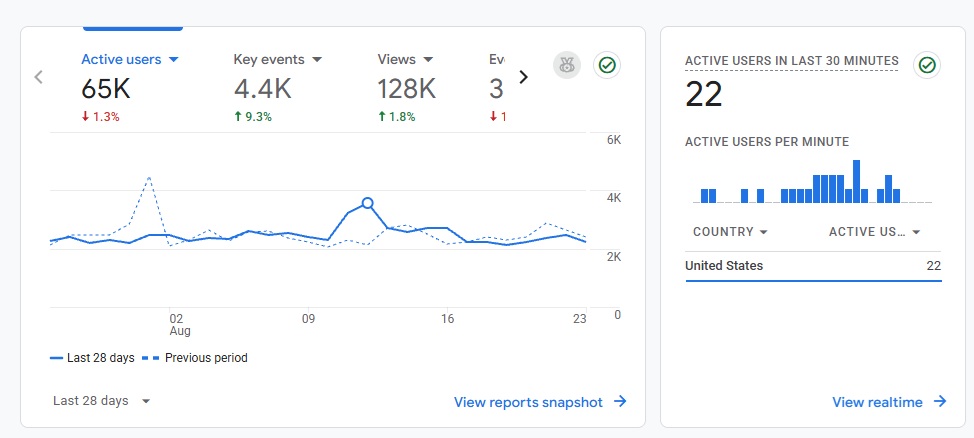
Now, I know the previous section covered a lot of steps, but after working through them, you are mostly set up to blog!
There are a few other things you should probably do at this point to be fully “live,” and this could be a good place to pause if you are working on backend work and aren’t necessarily ready for public consumption just yet. Still, you’ll need to take these next steps sooner rather than later, so let’s touch base on that.
One of the biggest places you will likely want your blog to be indexed in (and thus, discovered by readers) is in search engines, like Google. Broadly speaking, services like these (and most AI tools these days, for that matter) use web crawlers to read websites, parse their information, and determine whether or not to display them for any given search result.
We’re not going to bore you with those details right now- that comes later. But suffice it to say, if you want Google traffic, there are two ways to get yourself noticed by those crawling bots.
The first is to get linked by other sites, as crawling bots tend to just dart around from link to link, looking at all corners of the internet (which requires you to get a lot of backlinks, naturally). The second is to authenticate your site directly into Google Search Console.
I will caution that authenticating your blog in Search Console doesn’t necessarily guarantee that Google’s search bots will crawl or even index your site. In reality, all Search Console does is let you access the data Google has about your domain, such as impressions, clicks, rankings, and more. That said, once you are authenticated, Search Console also has an option to force submissions of your URLs to get read by crawling bots directly, too.
Again, it isn’t a guarantee of results in the slightest, but it is one way to signal to Google that you exist, and that’s better than nothing. Google has help documents here, but you’ll need to go through the verification process at some point all the same.
After doing this, you may also want to install Google Analytics on your site and authenticate that as well. Much like Search Console, there are many ways to do this. I like to do it via the MonsterInsights plugin mentioned above because it is relatively straightforward. They have a great tutorial on creating a Google Analytics property and syncing it with the plugin here.
Are either of these necessary for day one? Not really. But you do need to do this sooner rather than later, so it may just be a good checkbox to get going while you’re doing other setup-related tasks all the same, just to ensure you don’t forget about it down the line.
- Google’s Search Console is only one place you may want to authenticate your site. Most search engines have a similar portal, too, be it Bing, DuckDuckGo, Yandex, etc. You may want to take time to authenticate many of these when required; however, Google is still the largest and therefore our primary concern at the start. Most bloggers don’t get that much traffic from other search engines, if we’re honest.
9) Build Out Must-Have Pages

Now that your site is live, with some aesthetic structure in place and the most critical plugins in place for optimization, it is time to write.
You can go ahead and start writing blog posts now, but while you do that, it is wise to build out a few must-have pages to satisfy legal, user experience, and other SEO boxes. We have a full article on every page a blog should have, with more detailed explanations of each. But for a quick summary, you may want to consider having the following towards the start:
- Contact Page – A simple page with a contact form for readers to get in touch
- Advertising Page – If you are going to work with brands, a detailed page about working together and how to contact
- Terms & Conditions Page – A boilerplate terms and conditions page for use of site (your legal requirements may vary based on location)
- About Us Page – A page to show off who you are, your expertise (or growing expertise), and more
- Recent Posts – An archive page showing your latest articles (e.g. /blog/)
- Category Landing Pages – A landing page for major categories, linking to individual posts
- Sitemap – A page linking to your main category landing pages
Do you need all of these pages at the start? Not really.
You probably don’t need an advertising page when you’re new, if only because you’re unlikely to be working with brands for a while. Likewise, you also probably don’t need category landing pages at the start, either. We build out skyscraper articles on topics and link to them in our nav menu as we get more content. A sitemap, linked from a footer, for example, is an old SEO relic that helps users and bots reach your main categories and thus find new posts faster. Is it relevant in this day and age? It is hard to say, but we, personally, do it anyway.
One particular note here is that in your contact pages, we typically do not publish our email addresses directly. This is because so many services are out there that scrape emails to either sell them or for personal brand use (black hat SEO link buyers do this all the time). By using contact forms, such as the paid WP Forms plugin (which is admittedly quite expensive), I can tell when someone actually emails me from a real page on my site rather than obtaining my email address elsewhere, which goes a long way toward identifying spam/scams.
That said, you may be legally required to include more information, like an email address or physical address, directly on a Terms & Conditions Page, which is hard to avoid. Either way, an ounce of prevention goes a long way in the fight against spam, so be careful!
10) Set Up a Newsletter Service

Finally, we come to setting up a newsletter using services like MailerLite, Mailchimp, Kit, Substack, or more.
If there is one thing we think bloggers should be doing early on, even starting on day one, it is collecting email addresses to reach interested readers directly.
To put it bluntly, email marketing is one of the last remaining ways you can own your own content outside of a website. Social media? It is controlled by algorithms. Search results? Algorithms. We could go on.
But email, well, beyond nominal inbox filters, email marketing is a way that you can get your content in the hands of those who are most interested in each and every send. Our own emails are opened by anywhere from 40-60% of subscribers every week, and that is truly an impressive metric when you stop to think about it.
Many email marketing companies typically have email builder widgets, and some are even free up to a nominal amount of subscribers/email sends (anywhere from 500-2000 in a month is typical). After you exceed a company’s threshold, prices can go up dramatically, but it is a worthy expense in our minds in order to periodically send out content to your most engaged followers.
I spend over $100/month on my email lists, and it is a cost I am willing to pay to reach a combined 20,000+ subscribers whenever I want.
Much like everything else on this list, you do not necessarily need to have a full email marketing plan ready to go on day one. You don’t even need to have signup forms embedded on your site for day one, either. But this is one of those things that everyone really should be doing sooner rather than later, even if your list is just your mom and two other people, because it helps you get in the habit of email marketing right away- so don’t overlook this step in the near-term, too!
You’re Ready to Start Blogging
Phew, we’re done, and you are ready to go!
We’ll be the first to admit, this article doesn’t cover every single topic someone will face on their blogging journey. Far from it, actually.
But these are tips that I wish I could’ve given myself when I first started out nearly 20 years ago, and that’s step one.
When it comes down to it, we go back to the first three points we made way back at the start of this one, and it is simply that blogging is a long game. You must be interested in doing this because you are interested in the topic, and writing about it is something you could be passionate about for years to come.
Far too many would-be bloggers get into this industry in hopes of being an overnight success, register domains and build out websites (spending very real money, mind you), get three articles deep, become bored or frustrated that they’re not going fast enough, and give up. We don’t want you to do the same.
So if you got to this point 5,000+ words later and still think you’re interested in this crazy field that is blogging, we wish you the best on your journey. And, hey, maybe you should sign up for This Week in Blogging’s newsletter to stay up-to-date with what is going on in the world of blogging, too- we’ll send you one email every Tuesday and that’s it!
Join This Week in Blogging Today
Join This Week in Blogging to receive our newsletter with blogging news, expert tips and advice, product reviews, giveaways, and more. New editions each Tuesday!
Can't wait til Tuesday? Check out our Latest Edition here!
Increase your blog's revenue with Raptive!
Add premium display advertising on your blog with Raptive- accepting blogs starting at 25,000 pageviews per month! (Additional terms may apply.)
Upgrade Your Blog to Improve Performance


Check out more of our favorite blogging products and services we use to run our sites at the previous link!
How to Build a Better Blog
Looking for advice on how to improve your blog? We've got a number of articles around site optimization, SEO, and more that you may find valuable. Check out some of the following!